

Travel
Live local exploration with nearby guides.
Safety-First Local Discovery
LiveXpi helps you connect in real-time with local Guides across Travel, Task, and Live Events modes, with OTP verification, visible support, and practical safety guidance.
Travel
Live local exploration with nearby guides.

Task
Request, negotiate, and complete with clarity.

Live Events
Join local experiences as they happen.
LiveXpi is an intermediary platform connecting Explorers and independent Guides. Service availability may vary by region.
Concept Motion Layer
LiveXpi blends cinematic movement with practical trust cues, so users can instantly understand where they are in the journey, what happens next, and how to act safely.
Real-Time Guide Connection Engine
Nearby guide discovery with map-first context and live location clarity.
Request, negotiate responsibly, and close tasks with visible status updates.
Join local moments in real time with guided narration and interaction.
0+
Verified Users
0+
Active Guides
0+
Completed Sessions
0/5
Average Rating
Cinematic Product Showcase
Scroll each story to see how Live Events, Explore, and Task run in real-world sessions with clear control, practical transparency, and human guidance.
Feature 01
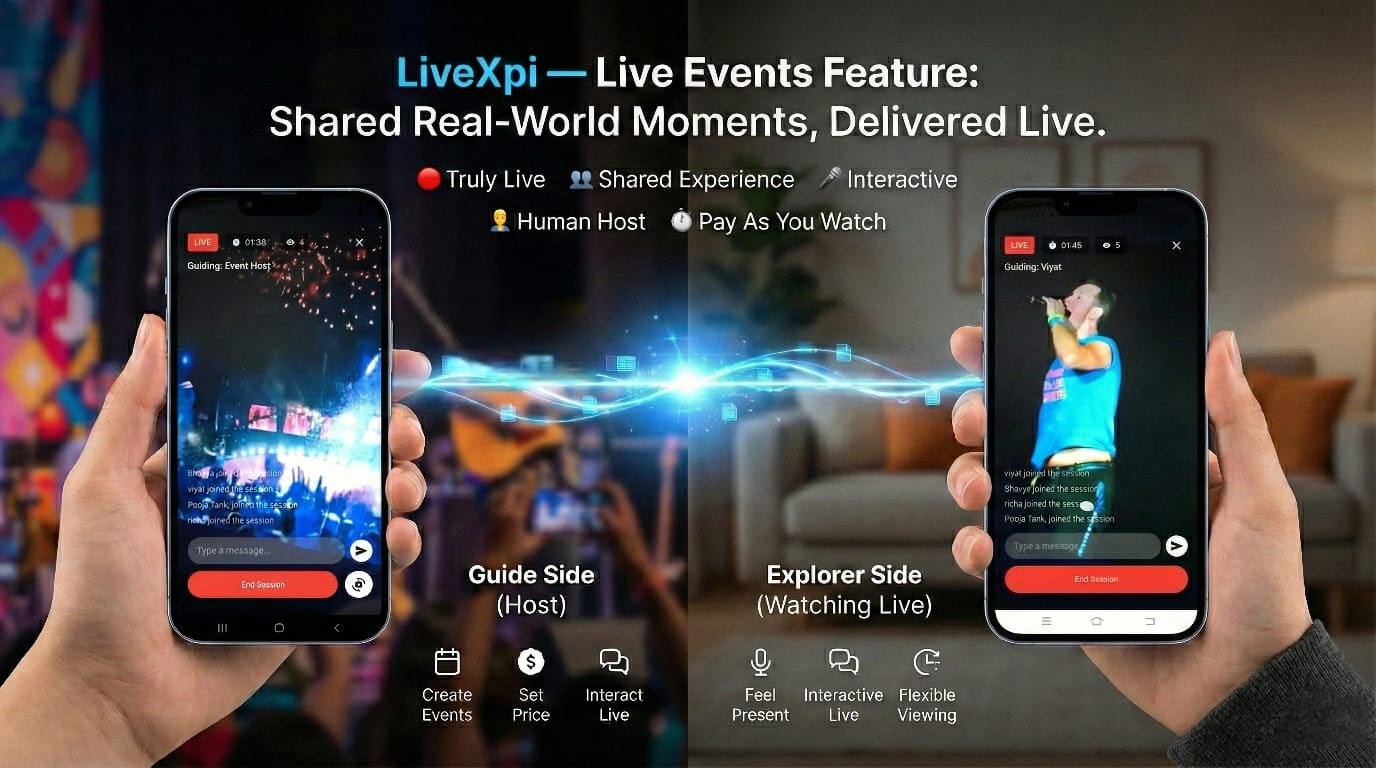
Host or join local moments in real time, with human-led narration and two-way interaction instead of static clips.
Best for
Best for festivals, cultural moments, city events, and places where you need real on-ground presence.
Session quality depends on network stability, regional availability, and host responsiveness.
Feature 02
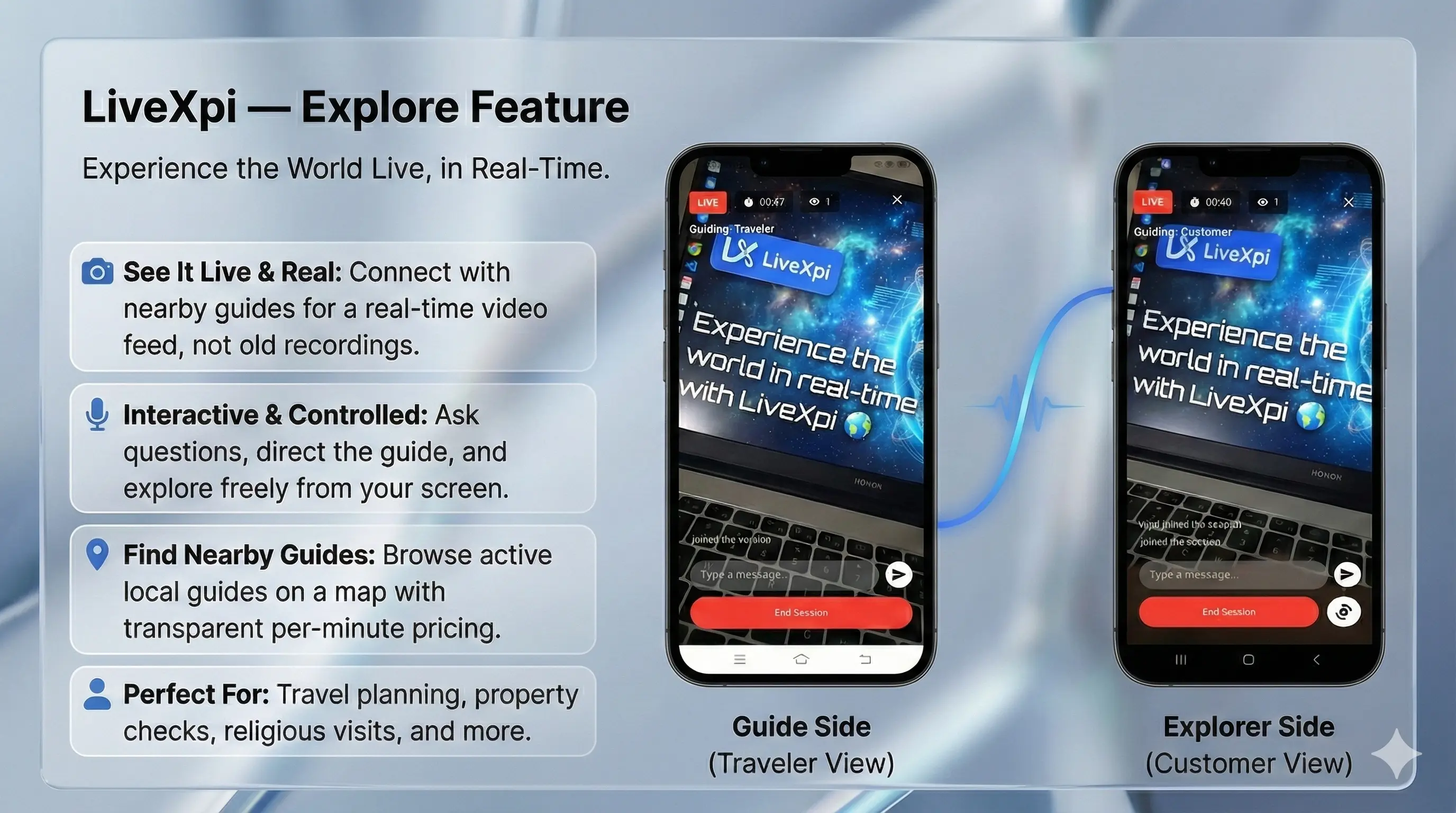
Connect to nearby guides and view real-time surroundings from your screen with direction-level control.
Best for
Best for route planning, neighborhood checks, religious visits, and pre-visit confidence building.
Guides act independently; users should verify critical decisions with their own judgment.
Feature 03
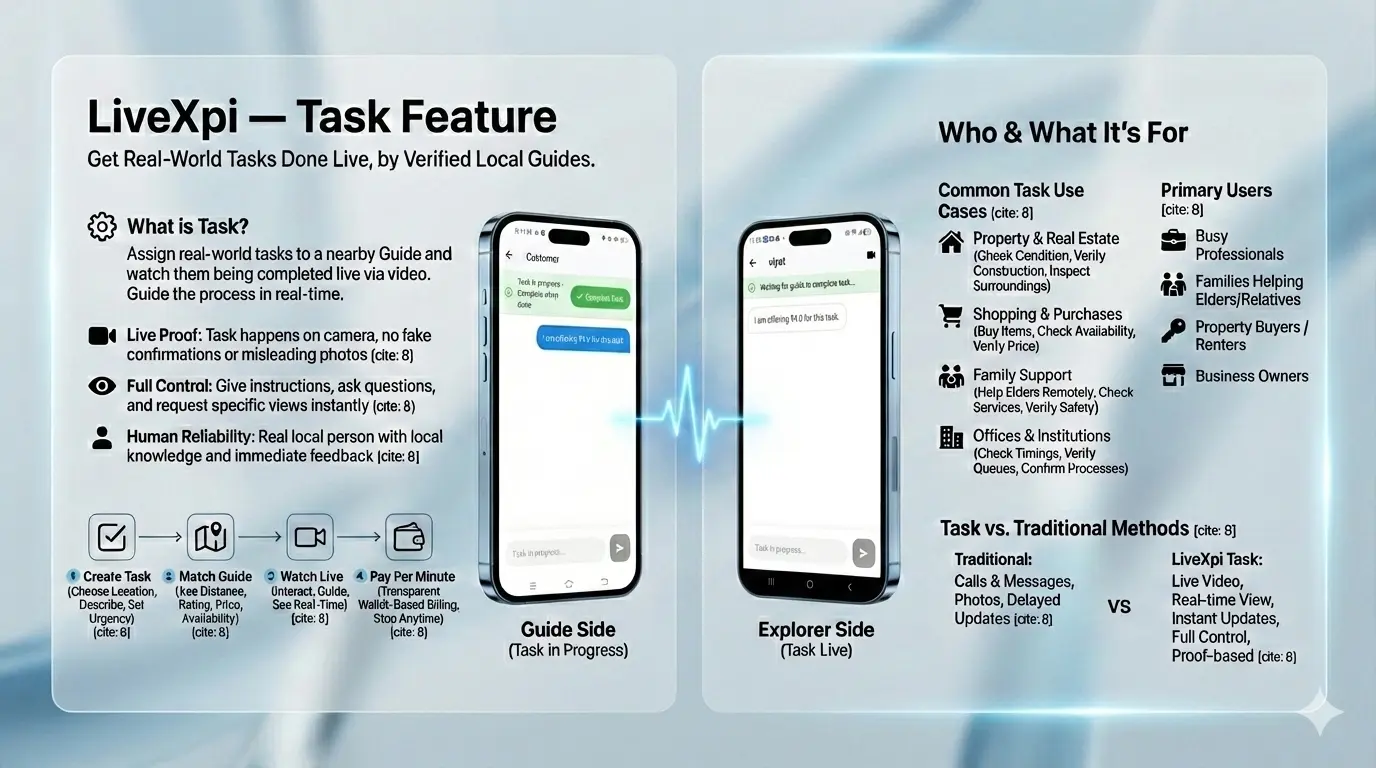
Assign practical tasks to a nearby guide, watch execution in real time, and close with evidence-backed confidence.
Best for
Best for shopping checks, office and institutional verification, family support tasks, and property-related actions.
Task outcomes vary by local conditions and guide availability. Earnings or completion are never guaranteed.
Earn as a Local Guide
Guide Mode is designed for reliable on-ground support. Accept requests responsibly, help Explorers live, and track eligible wallet earnings with clarity.
Earnings depend on completed eligible sessions, platform rules, user demand, and local availability.

Play Store Verification Ready
The website and app flows are intentionally aligned with disclosure clarity, user control, and support visibility expectations commonly reviewed in app-store evaluations.
LiveXpi is an intermediary technology platform connecting Explorers and independent Guides. Session decisions, local actions, and legal compliance responsibilities remain with participating users.
If you feel unsafe, end the session immediately, move to a safer public location, and contact local emergency services.
Do
Don't
| Permission | Why needed | When used | User control |
|---|---|---|---|
| Location | To show nearby Guides and improve map-based matching. | Only during location search, nearby discovery, or location-linked requests. | You can deny, allow once, or revoke anytime from device settings. |
| Camera | To enable live video sessions and optional media capture during support flows. | Requested only when starting a video session or camera-based interaction. | You can disable at any time; audio/chat modes remain available where applicable. |
| Microphone | To support live voice communication in sessions. | Only when audio/video mode is started by you. | Can be muted in session and revoked later from device permissions. |
| Notifications | To alert you on requests, updates, wallet actions, and support ticket responses. | After opt-in for push notifications. | You can switch off app notifications from device settings anytime. |
| Photos/Media Attachment | To upload relevant screenshots or attachments in support and request context. | Only when you tap attach/upload actions. | Attachment is optional; permission can be restricted by you. |
| Device/Usage Diagnostics | To detect crashes, fix stability issues, and improve app performance. | Collected in background with minimal technical metadata. | You may request support clarification or data action through Help Center. |
Account details (phone verification data), session metadata, transaction records, support ticket details, and technical diagnostics for app health.
To operate app features, process wallet actions, improve reliability, prevent misuse, and support dispute or service resolution workflows.
Raise a support ticket or use Data Deletion Request. You can also write tolivexpiapp@gmail.com for privacy-related requests.
View full Privacy PolicyLiveXpi is a platform where Explorers connect with local Guides through Travel, Task, and Live Events modes in real-time.
The app includes profile controls, reporting options, support tickets, session records, and visible safety guidance. Still, users must apply personal judgment in every interaction.
Cancellation options depend on request stage and mode. Applicable rules are shown in-app before confirmation.
Refund handling depends on issue type, session status, and platform policy. Refer to the Refund Policy and raise a support ticket for review.
Permissions are requested only for features you use, such as nearby discovery, live sessions, communication, and notifications.
Use Help Center or raise a support ticket in-app. You can also contact us at livexpiapp@gmail.com.
Use the Data Deletion Request link in footer or contact support with your registered phone details for verification.
Built for real conversations, clear expectations, and practical trust from first request to final review.
Download on Google PlayRegion availability, response time, and mode access may vary.